
Create a Cluster on Alauda OS
On this path, creates clusters whose nodes run Alauda OS, an image-based, read-only operating system. On Huawei DCS, Huawei Cloud Stack, and VMware vSphere, the nodes are virtual machines. On Bare Metal, they are physical servers.
TOC
ArchitectureWhatac Does and What the Platform DoesNodes Are Replaced, Not Changed in PlaceFixed at CreationSupported ProvidersControl Plane EndpointInstall the Providers on the global ClusterCluster Creation WorkflowRelated TasksArchitecture
Cluster API objects on the global cluster describe a cluster on Alauda OS. Two providers run on global and act on those objects:
- The Alauda Container Platform Cluster Bootstrap Provider turns machines into Kubernetes nodes with kubeadm and runs the control plane.
- An infrastructure provider creates the machines from Alauda OS images. There is one for each IaaS platform. On Bare Metal, the provider does not create virtual machines. It reinstalls the physical servers that you registered.
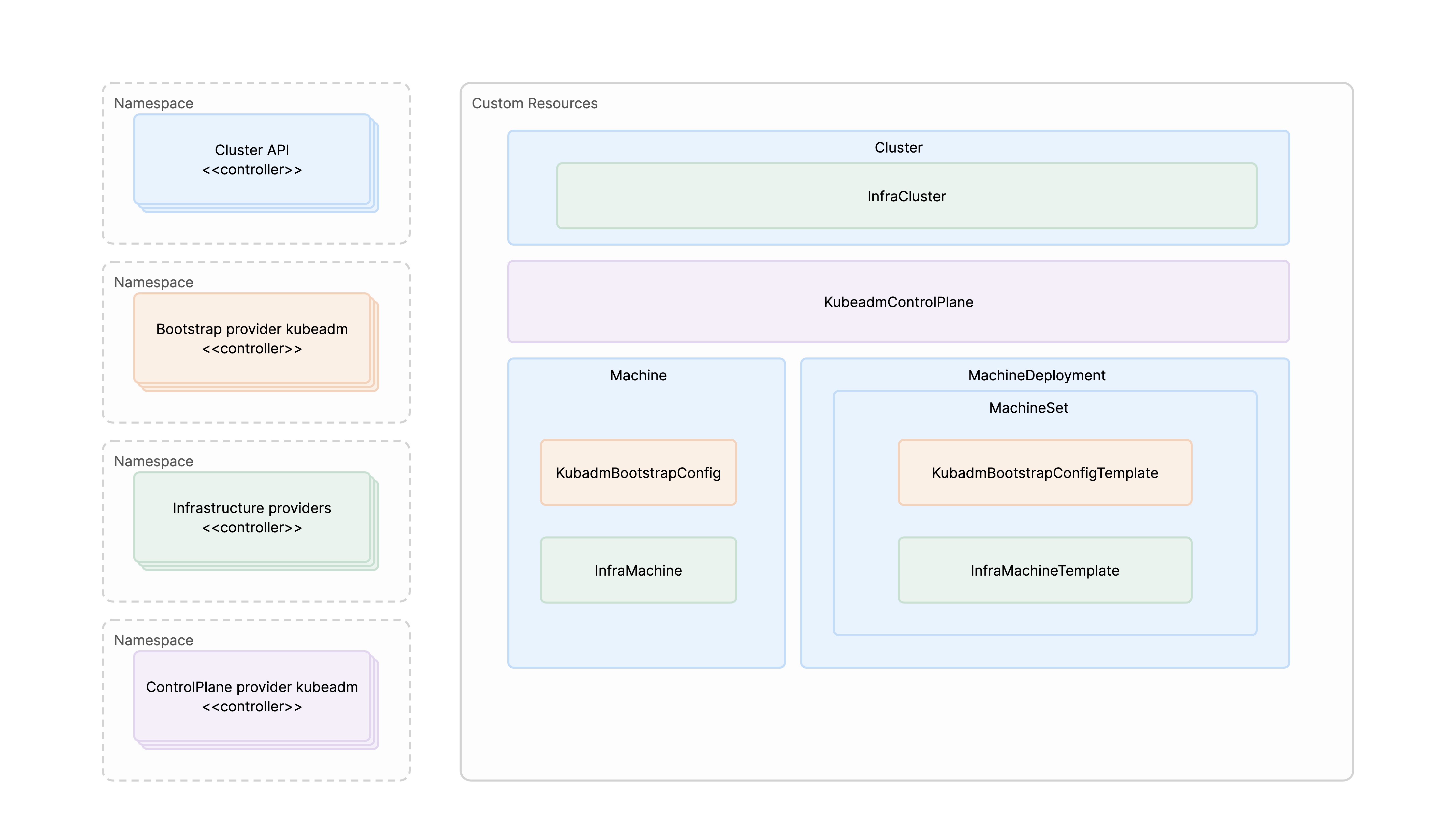
What ac Does and What the Platform Does
You create a cluster with ac adm alpha cluster create. ac renders the Cluster API and provider objects from one install-config.yaml, checks them, and applies them to the global cluster. From then on, the providers on global create the machines and keep the cluster running. For node changes, see Manage Nodes on Alauda OS Clusters. For version changes, see the upgrade documentation.
Nodes Are Replaced, Not Changed in Place
A Kubernetes or Alauda OS version change replaces the nodes one at a time. On Huawei DCS, Huawei Cloud Stack, and VMware vSphere, each node is replaced with a new virtual machine. On Bare Metal, the existing hosts are reinstalled, and a host that is removed from the cluster returns to its pool. To change supported OS settings, use Machine Configuration.
A cluster with a single control plane node is for testing and cannot be upgraded.
Fixed at Creation
Decide the following before you create the cluster, because you cannot change them on an existing cluster:
- The control plane endpoint mode and address. See Plan the Control Plane Endpoint.
- The image registry of the cluster, which is either the registry of the
globalcluster or a dedicated registry. See Choose the Image Registry for a Workload Cluster. - On Huawei DCS, Huawei Cloud Stack, and VMware vSphere, the layout of an existing persistent disk, such as its size and, on Huawei DCS, its datastore. On VMware vSphere, the addresses and disks of a pool slot also cannot be changed once a machine takes the slot. Plan the disks of each node pool before you create the cluster.
Supported Providers
Control Plane Endpoint
For what to prepare for each endpoint mode, see Plan the Control Plane Endpoint.
Install the Providers on the global Cluster
Install two providers on the global cluster: the provider for your IaaS platform and the Cluster Bootstrap Provider. Follow Install the Infrastructure Provider. A global cluster installed with ac already runs the Cluster Bootstrap Provider and the provider of its own platform.
Before you upgrade Kubernetes on an Alauda OS global cluster, upload and install the provider for that IaaS platform on the global cluster.
Cluster Creation Workflow
Follow these steps to create a workload cluster on Alauda OS. Prepare describes the first three steps in the same order.
- Install the Provider: Install the provider for your IaaS platform, and the Cluster Bootstrap Provider, on the
globalcluster. - Infrastructure Resources: Prepare what the provider requires, as listed on its Prerequisites page. With
ac, this is mainly the credential Secret and the IaaS objects thatinstall-config.yamlnames. On Bare Metal, this means the OS images, the registrations, and the registered hosts; see Prepare Alauda OS for Hosts and Register Hosts. - Plan the Cluster: Read Prepare for the decisions that apply to every provider, such as the control plane endpoint mode and the image registry of the cluster. Also check the following before you create the cluster:
- Node Labels and Taints: If you plan dedicated node pools (monitoring, logging, ingress), read Infra Nodes before you create the pools. It explains how to declare role labels and taints on a pool.
- CPU Baseline: For x86_64 cluster nodes that use ACP-provided Alauda OS images, the underlying CPUs must support the
x86-64-v2ISA baseline. For details, see OS Support Matrix.
- Create a Cluster: Create the cluster, including its first worker nodes, with
ac adm alpha cluster createfrom oneinstall-config.yaml.
Each provider has its own pages for these steps:
If a failure is not provider-specific, see Troubleshooting.